Searching for a signpost installer tool usually turns up two kinds of software: field-service apps that know nothing about signs, and sign tools whose phone app is an afterthought. This guide walks through what SignPostly's installer app and office tools actually do. Every screenshot comes from our automated test suite running on a practice company, so the agents, addresses and drivers you see are made up, but the screens are the real product.
The driver app
Route list
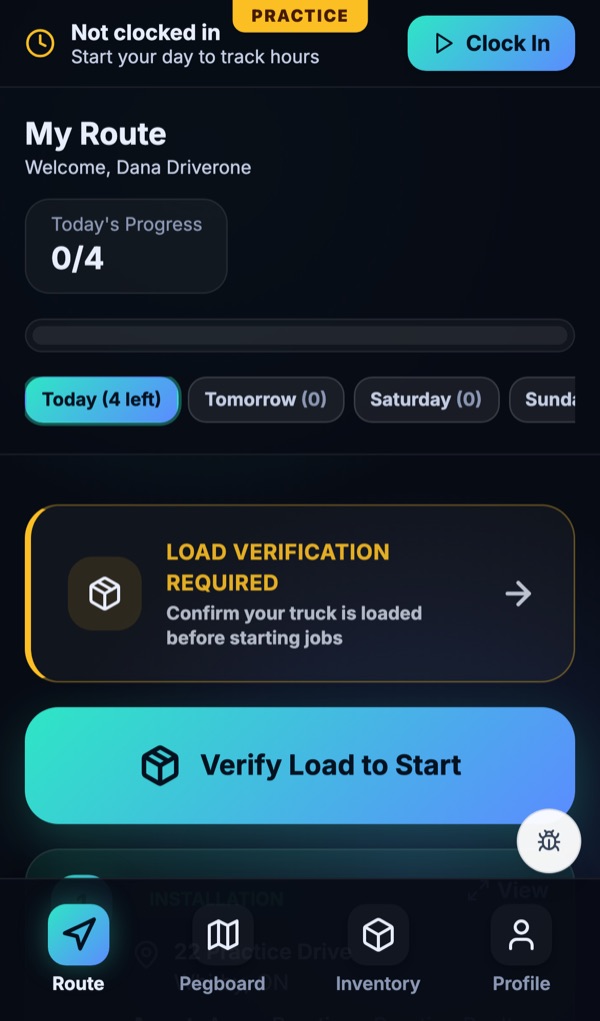
Drivers open the app to My Route: today's jobs in order with a progress count, plus day buttons that show how many jobs are waiting tomorrow and later in the week. Each stop shows whether it is an install or a removal, with its address.
Navigation by address
Tapping a stop opens directions by the job's address text, the same address the agent booked. Drivers are not sent to a map pin that someone dropped in the wrong spot.
Load-out checklist with truck kilometres
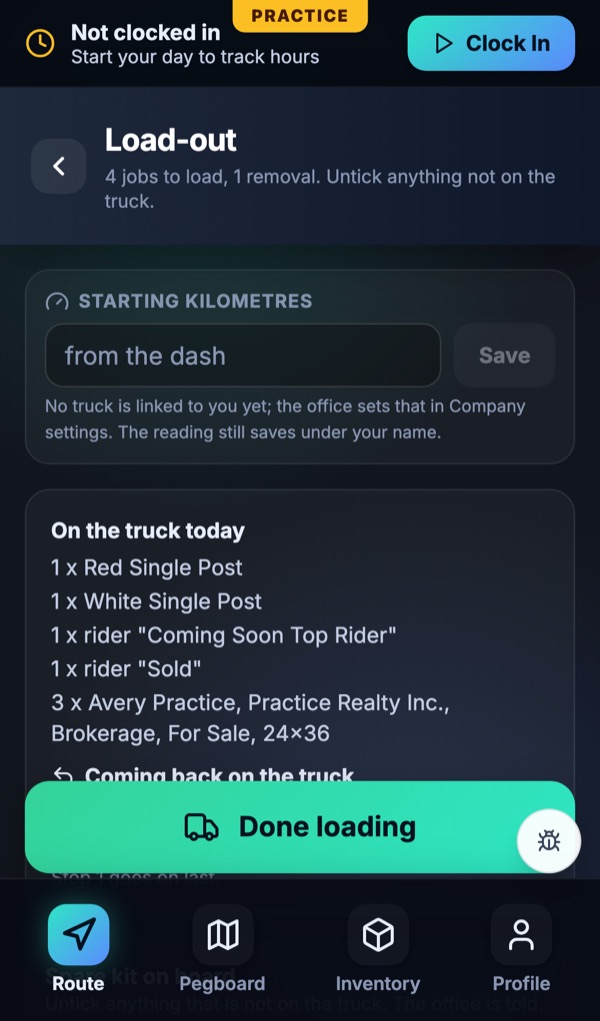
Before the first job the driver confirms the truck. The load-out screen asks for starting kilometres from the dash, then lists everything the day needs: posts, riders and each agent's panels, plus what is coming back on the truck from removals. Anything not on the truck gets unticked so the office knows before the driver is at the listing.
Offline photo queue
Listings are not always in good coverage. Completion photos wait in a queue on the phone and upload when the signal comes back, so the job still closes with its photo.
Route Builder: dispatching without the whiteboard
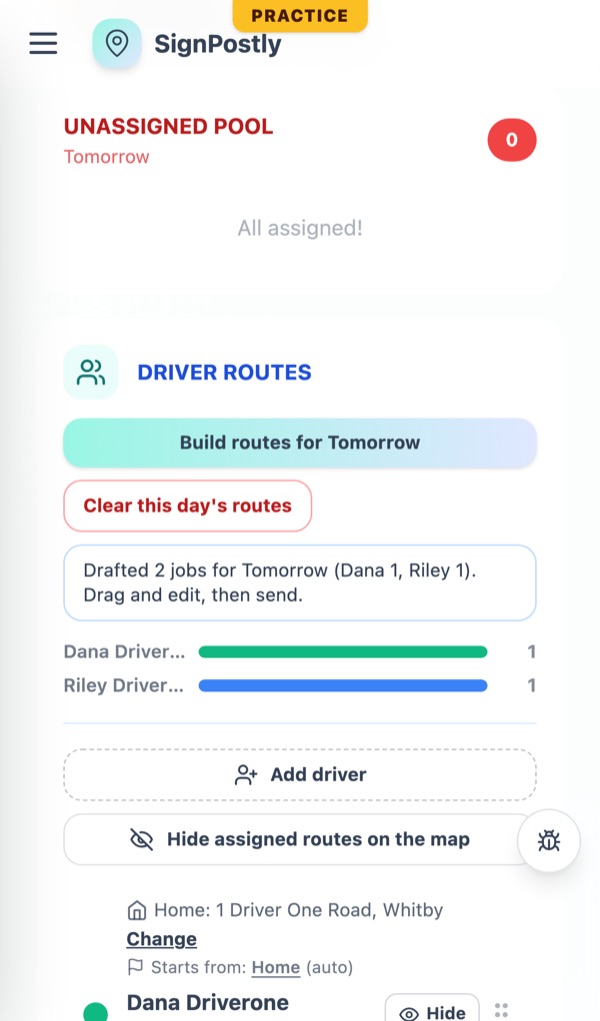
Automated dispatching for signs should save the dispatcher time without taking the decision away from them. In SignPostly's Route Builder you pick the day, press Build routes, and it drafts the routes: jobs assigned to drivers and put in an optimized order. You drag and edit anything you want, then send. Drivers see the route on their phones once it is sent.
For more on how routing works, read route optimization for sign installers.
The install photo check
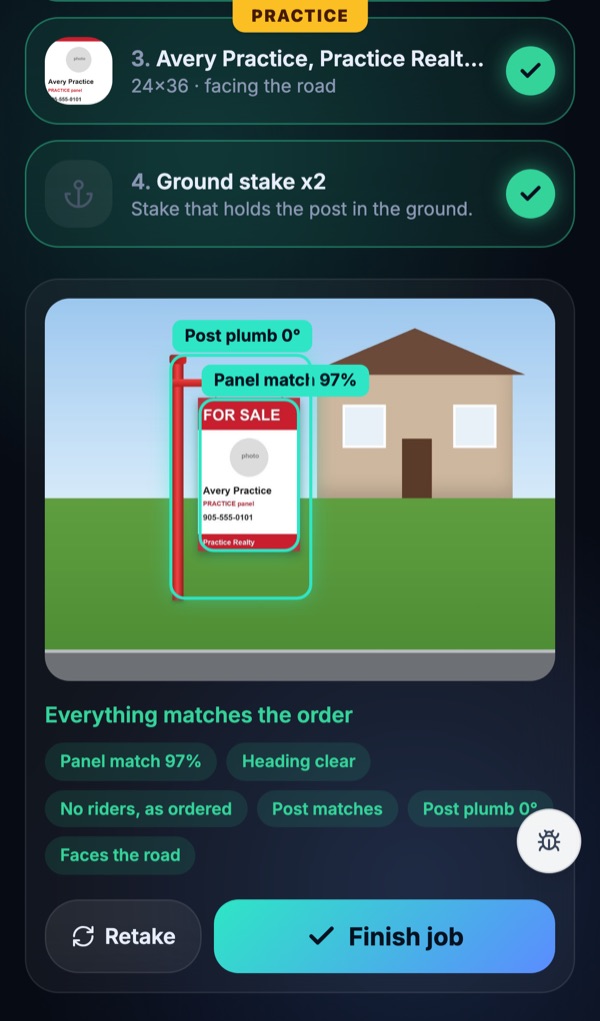
A completion photo only helps if someone looks at it. SignPostly's install photo check looks at it for you, right after the driver takes it: it compares the photo with the order for the panel, the riders and the post. If the wrong panel went up or a rider is missing, the driver sees it while still standing at the sign.
The office teaches the check
More on proof of completion: photo-verified installs.
Sign tracking: In the Ground and renewals
A sign tracker app has to answer one question instantly: what is standing right now? In the Ground shows every standing sign on a map and as a list, with its install date and next renewal. Each sign has a renewal timer, and renewals bill by saved card or by invoice, whichever the agent uses.
When the listing ends, the removal is a job on a route like any other. The sign leaves In the Ground only when the removal is done. See sign installation and removal software for the full removal workflow.
The sign management CRM side
A sign management CRM for an installer is less about a sales pipeline and more about the agents you already serve. SignPostly gives each agent a client portal where they order installs and removals, see the panels and riders you keep on the shelf for them, with photos, and pay invoices. Assistants can book for the agent they work for.
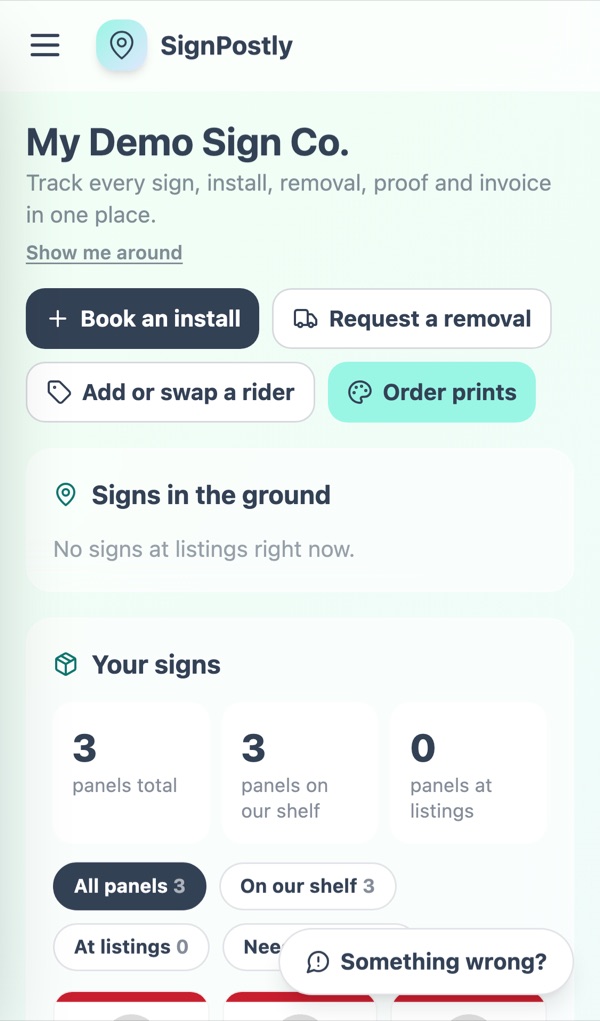
Orders also come in by email: SignPostly reads orders from agents' emails so the office does not retype them. Around that, you get pricing zones drawn on a map, oversized installs with a reason-based charge, a print desk for proofs and approval links, and margin analytics that include subcontractor costs.
More on the agent side: client portal for sign installers.
What to test in any installer app
- Open the driver app on a real phone, not a laptop demo.
- Turn off data, take a completion photo, and see what happens when the signal returns.
- Ask the vendor to build tomorrow's routes and send them while you watch.
- Ask for a list of every sign standing right now, with install dates.
- Run one removal from the agent's request to the sign leaving that list.
For the full buying checklist, see how to choose real estate sign installation software.
What it costs
SignPostly plans are priced by installs a month, and removals are always free. For a full breakdown and a cost per install comparison, read how much real estate sign installer software costs.
| SignPostly plan | Installs included | Monthly | Annual (2 months free) |
|---|---|---|---|
| Starter | Up to 50 installs a month | $79/month | $790/year |
| Growth | Up to 150 installs a month | $179/month | $1,790/year |
| Pro | Up to 400 installs a month | $299/month | $2,990/year |
| Unlimited | Unlimited installs | $449/month | $4,490/year |
| Enterprise | Custom volume | Custom quote | Custom quote |
Prices in USD. Plans count installs only; removals are always free. Every plan starts with a 14-day free trial with every feature, and no card is needed to sign up.
Frequently asked questions
What is a real estate sign installer app?
A real estate sign installer app is the phone app your drivers use to run the day: the route in order, the job details for each stop, what to load on the truck, and a photo step to close each install and removal. In SignPostly the driver app works with the office Route Builder, so routes the office sends show up on the driver's phone.
Does the driver app work without signal?
Yes for photos. SignPostly keeps completion photos in an offline queue on the phone and uploads them when the connection comes back, so a driver at a rural listing can still finish the job.
How does navigation work?
Each stop opens directions by the job's address text, the same address the agent ordered, so the driver's maps app routes to the house rather than to a dropped pin that may be off.
Is SignPostly a sign tracker app?
Yes. Every sign that is standing appears in In the Ground with its install date and next renewal, and each sign has a renewal timer. When the listing ends, the removal is its own job on a route, so the sign comes off the list only when it is actually back.
Can dispatching be automated?
Partly, and on purpose. Route Builder drafts the next day for you: it assigns jobs to drivers and optimizes the order. You review, drag anything you want to change, then send. Nothing goes to drivers until someone in the office sends it.
What does the install photo check look at?
It compares the completion photo with the order: the panel, the riders and the post. If something does not match, the driver sees it before leaving the site. When the office corrects a check, that correction is used to teach future checks.
Is SignPostly a sign management CRM?
It covers the CRM side that sign companies need: agents, the assistants who book for them, their orders, invoices and the panels and riders you store for them. It also tracks the signs themselves, which a general CRM does not.
How much does the app cost?
SignPostly plans are priced by installs a month, and removals are free. Every plan starts with a 14-day free trial with every feature, and no card is needed to sign up.
Try the installer app with your own routes
Every plan starts with a 14-day free trial with every feature. No card needed to sign up.
Related guides
Best Real Estate Sign Installation Software (2026)
SignPostly, SignTraker, Up Sign Down, SIGN-STREAM, QuoteIQ, InstallMySigns, Jobber and spreadsheets compared on routing, the crew app, removals and renewals, with real pricing.
How Much Does Real Estate Sign Installer Software Cost? (2026)
Published prices for SIGN-STREAM and SignPostly side by side, what drives the bill (installs, removals, renewals, photos, routes) and the cost per install at 50, 150 and 400 installs a month.
Real Estate Sign Installation Software & CRM
How to choose sign post installation software in 2026 - niche vs generic CRM, the feature checklist, and what separates install-only tools from full lifecycle platforms.
How to Price Real Estate Sign Installation
Per-install, subscription, and drive-time zone pricing - with real 2026 market ranges and a template to protect your margin.